
A green line on a phone screen is almost always a hardware failure inside the OLED or AMOLED display panel. It will not go away on its own. The fastest way to confirm this is a screenshot test: take a screenshot while the line is visible. If the line shows in the screenshot, the issue is software. If the screenshot looks clean but the line is still on your screen, the display panel or its connection to the motherboard is physically damaged. Run a restart first, back up your data right now, and check your manufacturer’s warranty before paying for a repair.
You pull your phone out of your pocket and there it is. A bright, thin green line cutting straight down your screen from top to bottom. You did not drop it. You did not get it wet. And yet there it sits, slicing through every photo, text, and app.
That green line on phone screen is not a random glitch that clears up on its own. It is a real display panel problem with a real cause. This guide covers what it is, how to tell if it is a hardware or software issue, what safe steps you can take to fix green line on phone screen at home, which phones are most affected, and how to decide between repair and replacement. Whether you have a green line on an Android phone screen or on an iPhone, the causes and the fix path are almost identical.
What Does a Green Line on Your Phone Screen Mean?
A green line on phone screen means one column of pixels has stopped receiving the correct signal from the display driver inside your phone. Every pixel on an OLED or AMOLED screen has three tiny parts: a red element, a green element, and a blue element. When the pixel driver circuit fails in a specific way, only the green elements in that column stay permanently switched on. This creates a bright vertical green stripe that appears on every single screen state.
Here is what this defect normally looks like:
- It runs in a straight line from the top of the screen to the bottom
- It does not move when you scroll, rotate, or switch apps
- It appears on your lock screen, your home screen, and inside every app
- It is brighter and more visible on dark backgrounds
This defect appears almost exclusively on phones with OLED or AMOLED displays. Phones that use LCD screens almost never develop this type of fault. In more than 95% of cases, a persistent vertical green line is a hardware failure that a software update or factory reset will not remove.
Is a Green Line on a Phone Screen Hardware or Software?
The fastest diagnostic is a screenshot test. You can do this in under 30 seconds.

The Screenshot Test:
- While the green line is visible on your screen, take a screenshot using your phone’s button combination.
- Open the screenshot and look at it carefully.
- If the green line appears inside the screenshot image, the problem is in your software or display driver.
- If the screenshot looks perfectly normal but the green line is still on your screen, the display panel or its connection to the motherboard has physical damage.
This one test tells you more than any restart or factory reset could.
Signs It Is a Hardware Problem
These signs point to a failed TFT array, a broken display connector, or a damaged flex cable inside the display assembly:
- The green vertical line appears on the boot screen or brand logo when the phone turns on
- The line stays in the exact same position no matter how you hold or rotate the phone
- Light pressure near the line does not make it shift, flicker, or disappear
- The line appeared right after the phone was dropped, bent in a pocket, or exposed to liquid
- The screenshot test shows a clean image with no green line
Signs It Might Be a Software Glitch
These situations are much less common, but they do happen:
- The line only appears inside one or two specific apps and not on the home screen
- The line went away completely after a full restart
- The problem started right after installing a new app
- The screenshot shows the line inside the captured image
If any software signs match your situation, uninstall recently added apps and install any available software updates. If that clears the line, the OLED display panel itself is fine.
What Causes a Green Line on a Phone Screen?
There are five main causes. Most users who see a green line on their screen did not do anything wrong.
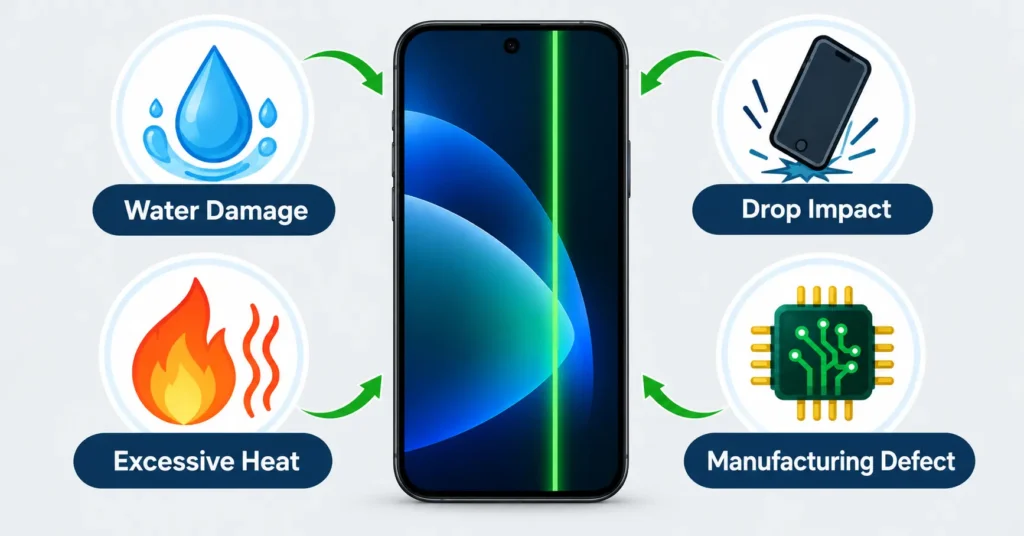
1. Manufacturing defect in the OLED panel. This is the most common cause. Some phones leave the factory with a small weakness in the display bonding or pixel driver circuit. That weakness stays hidden for months and then shows up as a green line, often without any user damage at all. Multiple brands including Samsung Galaxy, OnePlus, and Apple have seen widespread reports of this type of manufacturing defect.
2. Drop or physical impact. A green line on phone screen after drop is one of the most common hardware presentations. Even a fall that does not crack the glass can damage the flex cable or delaminate the layers inside the AMOLED panel. The display connector between the screen and the motherboard can loosen from a single impact, cutting the signal to an entire column of pixels.
3. Water or moisture damage. Moisture corrodes the metal contacts on the display connector or flex cable. This breaks the electrical signal to a column of pixels and produces the same green vertical line defect as a physical impact. The line may show up days after the water contact because corrosion builds up gradually on the connector contacts. (A full section on this is below.)
4. Heat from a software update. A green line on phone screen after update is one of the most reported and most misunderstood scenarios. Major software updates make phones run hot for extended periods. This heat can push a display panel with a hidden flaw over the edge into visible failure. The software update did not cause the damage. It simply sped up a hardware failure that was already on the way.
5. Excessive heat exposure. Leaving your phone in a hot car, in direct sunlight for hours, or near a heat source can degrade the adhesive bonding layers inside the display assembly. OLED panels are more sensitive to heat damage than LCD screens.
Which Phones Get the Green Line Issue Most Often?
The green line issue affects phones with OLED and AMOLED displays. Phones that use LCD screens almost never develop this specific fault because of the differences in how their pixel signals are structured.
Brands and models with the most reported cases:
Samsung Galaxy (S20, S21, S22 series). These models have the highest volume of green line on Samsung screen reports globally. Samsung ran a free screen replacement program for affected S20 to S22 and Note 20 range models, but that program closed around December 2025. Check with your local Samsung Service Center for any regional exceptions.
OnePlus (OnePlus 9 Pro and other AMOLED models). OnePlus India launched a lifetime screen warranty specifically covering this defect under the OnePlus Green Line Worry-Free Solution. This program is still active as of October 2026 for eligible models.
Apple iPhone (X and later OLED models). Green line on iPhone screen cases have been reported on the iPhone X, 11 Pro, 12 Pro, 13 Pro, and later OLED models. Apple does not have a formal green line program. Standard warranty and AppleCare+ terms apply.
Google Pixel 8 and Pixel 9 Pro. Google offers a free display replacement for eligible Pixel 8 and Pixel 9 Pro units within three years of purchase. This program has been available since December 2025 and is confirmed active as of September 2026.
Xiaomi, Redmi, Vivo, and Oppo AMOLED models. These brands are also affected. Third-party repair centers generally offer the most affordable AMOLED screen replacement for these models.
What Can You Try at Home Before Paying for Repair?
Steps to Try First
Work through these in order. All of them are safe and cost nothing.
Step 1: Do a full restart. Hold the power button and turn the phone completely off. Then turn it back on. This is not the same as locking the screen and waking it up. A full power cycle clears temporary graphics driver states that a screen lock does not.
Step 2: Run the screenshot test. As covered above, this confirms in seconds whether the issue is in the display panel or the software. Do this before any other troubleshooting step.
Step 3: Boot into Safe Mode (Android). Safe Mode disables all third-party apps. If the green line disappears in Safe Mode, a recently installed app is causing a display conflict. Uninstall any apps you added before the line appeared and restart normally.
Step 4: Run the Samsung display diagnostic (Samsung Galaxy only). Open your phone app and type #0# using the keypad. A hidden hardware test screen opens. Tap the red, green, and blue color boxes and check if the line is still visible on a solid color screen. If the line disappears on these screens, the issue may be related to an app or display driver rather than the panel itself.
Step 5: Check for a software update. Go to Settings and install any pending system updates. A small number of green line cases have been resolved by display driver patches pushed by manufacturers.
Step 6: Back up your data right now. Do this before anything else, even before the restart. A single green vertical line can spread to multiple lines or lead to full screen failure without much warning. Getting photos, contacts, and files off a completely dead screen later is difficult and expensive.
What You Should Never Do
These methods will not fix the green line and will cause additional damage:
- Do not use a flame or lighter near the bottom edge of the phone. This viral method causes battery swelling, screen burns, and fire risk.
- Do not press on the green line or try to rub it away. Pressure can crack the glass internally or damage the digitizer layer beneath.
- Do not open the phone yourself. Modern phones use fragile ribbon cables and waterproof adhesive seals. Opening the phone destroys its IP rating and risks further display damage.
- Do not apply the rice method. Rice absorbs some air moisture but does not repair a failed AMOLED panel, a broken flex cable, or a corroded display connector.
Repair, Replace, or Warranty: How Do You Decide?

Check Manufacturer Warranty First
Before spending money, check whether your phone qualifies for a free or low-cost repair through an official program.
| Brand | Program Status (October 2026) |
| Google Pixel 8 and Pixel 9 Pro | Free repair within 3 years of purchase. Program is active. |
| OnePlus (India) | Lifetime warranty for green line defects on AMOLED models. Active. |
| Samsung Galaxy S20 to S22 | Free program closed around December 2025. Check local Samsung Service Centers for regional exceptions. |
| Apple iPhone | No formal green line program. Standard warranty and AppleCare+ terms apply. |
If your phone qualifies, bring it to the service center with proof of purchase. Visible physical damage or a triggered Liquid Contact Indicator (LCI) strip inside the SIM tray can disqualify a device from warranty coverage even when the green line itself is a manufacturing defect.
How Much Does a Screen Repair Cost?
If warranty is not available, these are typical phone screen repair costs for OLED display replacement:
| Device | Authorized Service Center | Third-Party Repair Shop |
| Samsung Galaxy (OLED models) | $200 to $400 | $139 to $289 |
| iPhone (OLED models) | $280 to $450 | $150 to $300 |
| OnePlus, Pixel, Xiaomi, Redmi | $80 to $200 | $40 to $120 |
Prices vary by model and region. OEM (original manufacturer) display panels generally have better color accuracy, brightness, and touch sensitivity than aftermarket screens. If you plan to keep the phone for another year or more, an OEM display is worth the extra cost.
When Does Repair Make Sense vs. Replacement?
A straightforward rule: if the repair cost is under 50% of the phone’s current resale value, repair is the better financial choice.
If your phone is three or more years old and the screen replacement would cost close to what the device is worth right now, replacing the phone may be the smarter option. Ask your local repair shop for a free diagnostic estimate before making the call. Most reputable shops assess for free, and knowing the exact cost makes the decision clear.
One practical note: after a screen replacement, avoid heavy gaming and video streaming for the first few days to let the new display bonding settle. Keep the phone cool and away from pockets that create consistent pressure on the screen.
Can Water Damage Cause a Green Line on Your Phone Screen?
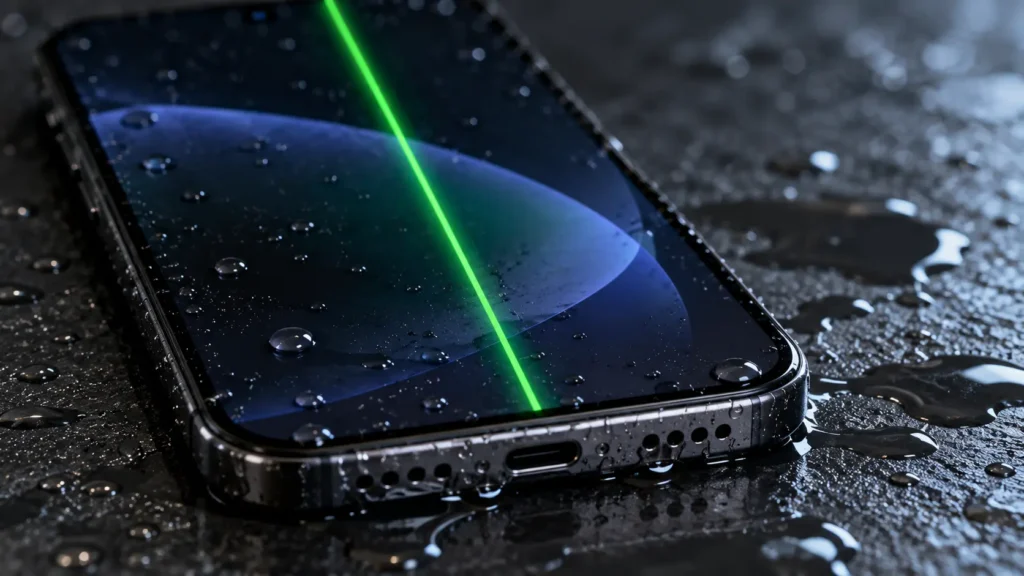
Yes. Water damage is a documented cause of the green line on phone screen defect, and it is one that many users do not think of because the line may appear days or weeks after the water contact.
Here is what happens at a hardware level. Moisture that enters the phone reaches the metal contacts on the display connector or the flex cable that links the screen to the motherboard. Salt and mineral deposits in the water cause corrosion on those contacts. As the corrosion builds up, the electrical signal to one column of pixels weakens and eventually breaks. When that column loses its signal, the green sub-pixels stay permanently lit, producing the vertical green line you see on screen.
This means your phone does not have to be fully submerged. A splash, steam from a shower, sweat during a workout, or brief rain exposure can all leave enough moisture behind to corrode the display connector over the following days.
Water that travels through the display connector also passes through the same internal channels as the speaker grill, the microphone, and the charging port. If water triggered the green line on your screen, there is a good chance moisture is also trapped in the speaker at the same time.
The screen damage requires a professional repair. The speaker damage can be addressed right now at no cost. Use Fix My Speaker to push moisture out of your speaker while you arrange the screen replacement. Do not plug in a charging cable while any part of the phone is still wet. Charging a water-damaged phone corrodes the port contacts and can short the power system.
What to Do Next
If water or moisture is what triggered the green line on your screen, the display panel is not the only component at risk. Water that reaches the display connector also travels through the same internal channels as the speaker grill, the microphone, and the charging port.
While you arrange a screen replacement with your manufacturer or a local repair shop, protect your speaker right now with Fix My Speaker. It is free, runs in your browser, and takes about two minutes. Your screen still needs a professional repair. Your speaker does not have to suffer the same damage while you wait.
Frequently Asked Questions
Why did a green line suddenly appear on my phone with no drop or damage?
The most common cause with no visible damage is a manufacturing defect in the OLED or AMOLED display panel. Some phones leave the factory with a small flaw in the display bonding or pixel driver circuit. That flaw can stay hidden for months and then appear as a green vertical line, especially after the phone heats up during a major software update. This is a known issue across Samsung Galaxy, OnePlus, and iPhone OLED models. You did not cause it.
Does a factory reset fix a green line on a phone screen?
A factory reset does not fix a persistent green line. If the line is visible on the lock screen, home screen, and boot logo, the fault is inside the hardware of the display panel. A reset removes apps and data from the software layer. It cannot repair a broken TFT array, a failed pixel driver, a damaged flex cable, or a corroded display connector. If the line disappears after a reset, the cause was a software or app conflict, which is rare but possible.
Will the green line on my phone screen get worse over time?
Yes, it can get worse. Display panel damage often spreads. One thin green vertical line can become two or three lines. The existing line can widen. Touch response near the line can start to fail. Back up all your data right now while the screen is still working. Getting photos and contacts off a completely dead, locked screen later requires expensive data recovery equipment and is not always possible.
Can I still use my phone if it has a green line?
Most phones with a green line still function normally for calls, apps, and touch input. The defect is in the AMOLED display panel only. The phone’s processor and system are not damaged. You can keep using it, but create a full backup as soon as possible. Screen panel damage can spread to full display failure without much warning, and the window to back up data through a still-working screen can close quickly.
Is a green line on a phone screen covered under warranty?
It depends on your brand and when the defect appeared. Google Pixel 8 and Pixel 9 Pro owners can receive a free display replacement within three years of purchase through Google’s active repair program. OnePlus in India offers a lifetime warranty covering this defect on AMOLED models under the OnePlus Green Line Worry-Free Solution. Samsung’s free program for S20 to S22 models closed around December 2025. Apple has no formal green line program. Check directly with your manufacturer’s service center for your region’s current options.
How much does it cost to fix a green line on a phone?
Screen replacement costs vary by brand and repair center. Samsung OLED repairs typically run $139 to $289 at third-party shops and $200 to $400 at official Samsung Service Centers. iPhone OLED replacements cost $280 to $450 at Apple and $150 to $300 at third-party shops. OnePlus, Google Pixel, and Xiaomi models typically run $40 to $120 at third-party shops and $80 to $200 at authorized centers. If the repair cost is less than 50% of what the phone is currently worth, repair is generally the better financial move.
Can water damage cause a green line on a phone screen?
Yes. Moisture corrodes the metal contacts on the flex cable or display connector that carries signals from the motherboard to the screen. When those contacts corrode, the electrical signal to a column of pixels breaks. The column then stays permanently lit on the green sub-pixels, producing the vertical green line. This damage can appear days or weeks after the water contact as corrosion builds gradually. If your phone recently got wet and now shows a green line, both the screen and the speaker may need attention from the same water exposure.