The most downloaded notification sounds in 2026 include Light Hearted, Sly, Joyous, Come Here, and six more. All are free on notificationsounds.com, Mixkit, and Zedge as MP3 audio files for Android or M4R format for iPhone. On Android, move the file to the Ringtones folder and pick it in Settings > Sound and Vibration. On iPhone, convert it to M4R using GarageBand first, then set it in Settings > Sounds and Haptics.
You reach for your phone. Two other people at the table do the same. Same default ding. All three of you.
That generic alert tone came pre-loaded on hundreds of millions of phones. Swapping it takes under two minutes, and the best notification sound downloads are free.
This guide lists the top 10 notification sounds to download as MP3 right now. It covers what each one sounds like, where to get it at no cost, and how to set it on Android or iPhone step by step.
The average US smartphone user gets 46 push notifications per day. A unique phone sound means you know right away which alert is yours.
What Are the Most Downloaded Notification Sounds Right Now?
notificationsounds.com has tracked free notification tone downloads since 2008. Its live popularity chart shows which audio alert files real users choose most. Every sound on the site comes under a Creative Commons license. That means you can download them, set them as your default notification sound, and use them on any personal device for free.
File formats include MP3 for Android, M4R for iPhone, and OGG for Android apps that accept it.
The top 10 list below pulls from that live chart, plus a few standout picks from Mixkit and Uppbeat. Each entry is short, clear, and ready to download right now as a free notification tone.
Top 10 Notification Sounds to Download Free as MP3
Here are the 10 best notification sound downloads right now, listed by popularity. Each entry covers what the sound is like, who it works best for, and where to get it.

1. Light Hearted
Light Hearted is the most downloaded notification sound on notificationsounds.com. It plays as a short, cheerful melody with a warm, bright tone. The sound lasts about two seconds and has an upbeat character that is friendly without being loud or annoying.
- Best for: General phone alerts, any app
- Download: notificationsounds.com
- Formats: MP3, M4R, OGG
2. Sly
Sly is one of the quietest tones on this list. It is a short, subtle ding that comes and goes fast. The tone has a soft quality that makes it a good alert tone for offices, libraries, or classrooms where you need a low-key message tone.
- Best for: Work messages, quiet settings
- Download: notificationsounds.com
- Formats: MP3, M4R, OGG
3. Joyous
Joyous is a warm chime notification with a clear, melodic ring. The sound sits between a bell and a xylophone. It lasts one to two seconds and has a calm, pleasant tone. Most users pick this one for social media apps and personal SMS tone alerts.
- Best for: Text notifications, WhatsApp, social media
- Download: notificationsounds.com
- Formats: MP3, M4R, OGG
4. Come Here
Come Here plays as two short notes that follow each other fast. That quick two-note call makes it easy to pick out in a loud room. If you often miss mobile notification alerts in noisy places, this phone sound cuts through better than a single ding.
- Best for: Important work alerts, emails you cannot miss
- Download: notificationsounds.com
- Formats: MP3, M4R, OGG
5. No Problem
No Problem is a short, positive completion sound. It feels like a quick check mark. The tone is soft and brief, which makes it a solid fit for email alerts, calendar reminders, or any productivity app where you want a sound but not a loud one.
- Best for: Email, calendar reminders, task apps
- Download: notificationsounds.com
- Formats: MP3, M4R, OGG
6. Slick
Slick is under one second long. It is the kind of notification sound you hear but barely notice. The design is minimal by choice. It suits people who want a phone sound that confirms a message arrived without pulling attention away from what they are doing.
- Best for: Background apps, minimalist phone setups
- Download: notificationsounds.com
- Formats: MP3, M4R, OGG
7. Phone Alert – Marimba Bubble
This bright marimba-style chime comes from Uppbeat. It has a clean pop that carries well in noisy settings. The sound is close to a built-in Android notification tone but with a crisper, rounder finish. A solid daily driver for anyone looking to replace the default notification sound for Android.
- Best for: Message alerts, daily notification replacement
- Download: uppbeat.io
- Formats: MP3
8. Message Pop Alert
Message Pop Alert is a quick, crisp sound from Mixkit. It comes under the Mixkit License and works on any Android phone with no file conversion needed. Think of it as the standard notification ding but with a cleaner, sharper edge. Short, neutral, and good for any app.
- Best for: SMS tone, text message notifications, general use
- Download: mixkit.co
- Formats: MP3
9. Notification Bell – Classic Ding
This one-second bell tone from Uppbeat is clean and simple. It rings once with no reverb fade. It sounds like a single, clear bell strike. Easy to recognize in any setting, this classic ding works well as a universal replacement for the default iPhone chime or Android alert tone.
- Best for: Universal use, replacing the built-in default sound
- Download: uppbeat.io
- Formats: MP3
10. Giggling Cute Girl – ASMR Variation
This ASMR notification sound from notificationsounds.com is one of the fastest-rising picks on the popularity chart right now. It plays as a light, soft laugh about two seconds long. Trending on social media, it is one of the most shared trending notification sounds among users who want something personal and different from a standard chime.
- Best for: Personal chats, social media notifications
- Download: notificationsounds.com
- Formats: MP3, M4R, OGG
Quick Comparison
| Sound Name | Mood | Duration | Source | Formats |
| Light Hearted | Cheerful | 1-2 sec | notificationsounds.com | MP3, M4R, OGG |
| Sly | Subtle | ~1 sec | notificationsounds.com | MP3, M4R, OGG |
| Joyous | Warm | 1-2 sec | notificationsounds.com | MP3, M4R, OGG |
| Come Here | Distinctive | ~2 sec | notificationsounds.com | MP3, M4R, OGG |
| No Problem | Positive | 1-2 sec | notificationsounds.com | MP3, M4R, OGG |
| Slick | Minimal | <1 sec | notificationsounds.com | MP3, M4R, OGG |
| Marimba Bubble | Bright | ~1 sec | uppbeat.io | MP3 |
| Message Pop | Classic | <1 sec | mixkit.co | MP3 |
| Classic Ding | Clean | ~1 sec | uppbeat.io | MP3 |
| ASMR Giggle | Trending | 1-2 sec | notificationsounds.com | MP3, M4R, OGG |
For more free options beyond notification sounds, see our guide on the best free ringtone download MP3 sites for Android and iPhone.
Do These Notifications Sounds Free and Legal to Use?
Yes. Every sound on this list is free for personal use.
notificationsounds.com releases all its audio files under a Creative Commons license. You can download them, set them as your default notification sound, and keep them on any personal phone at no charge.
Mixkit sounds come under the Mixkit License, which also covers free personal use with no account needed. Uppbeat’s free tier lets you download royalty-free sounds without paying, though some files ask you to sign up for a free account before the download starts.
One thing to be clear on: downloading a copyrighted song from YouTube or a streaming app and using it as a phone sound is not the same thing. That crosses into copyright territory. Stick to platforms built for free notification tone downloads and you will not run into that problem.
How Do You Set a Custom Notification Sound on Android?
To set a custom notification sound on Android, follow these steps:
- Download the MP3 audio file to your phone.
- Open your file manager app. Google Files works on most Android phones.
- Go to the Downloads folder and find the file.
- Move or copy it to Internal Storage > Ringtones.
- Go to Settings > Sound and Vibration.
- Tap Default Notification Sound.
- Find your file in the list and tap it to set it.
- Restart your phone if the file does not show up right away.
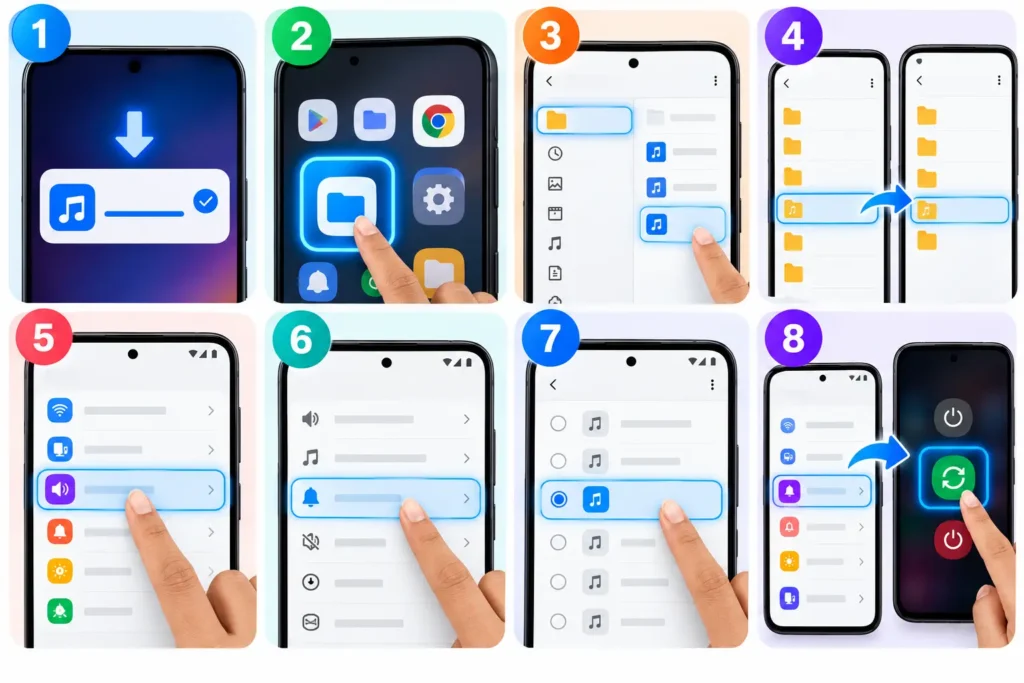
This process works on Samsung Galaxy, Xiaomi Redmi, Realme, OnePlus, and Pixel phones running Android 12 or later. On Samsung Galaxy devices, the menu reads Sounds and Vibration rather than Sound and Vibration.
How Do You Set a Different Notification Sound for One App on Android?
Each app can use its own alert tone. Go to Settings > Apps, tap the app you want to change, then tap Notifications. Select the notification channel and tap Sound. This lets you assign a different message tone to Gmail, WhatsApp, or any other app without touching the system default.
How Do You Set a Custom Notification Sound on iPhone?
iPhone does not accept plain MP3 files as custom notification sounds. The file needs to be in M4R format first. GarageBand is a free Apple app that handles the conversion with no computer required.
Method: Using GarageBand
- Download GarageBand from the App Store if you do not already have it.
- Open the app and tap the plus button to start a new project.
- Choose Audio Recorder.
- Import your MP3 into the project.
- Trim the clip to under 30 seconds.
- Tap the share icon and choose My Songs.
- Long-press the saved project, tap Share, then tap Ringtone.
- Name the tone and tap Export to Ringtone Library.
- Go to Settings > Sounds and Haptics.
- Tap Text Tone or your preferred notification category. Your custom notification sound will appear in the list.
This works on iPhone 15, iPhone 16, and all recent iOS versions.
Why Won’t My MP3 Work as an iPhone Notification Sound?
iPhone reads notification sounds in M4R format only. A plain MP3 audio file will not show up in Settings > Sounds and Haptics. The GarageBand steps above convert it to the right format at no cost. No third-party app or paid service needed.
Why Does Your New Notification Sound Muffled or Quiet?
If your downloaded notification sound plays but sounds flat, thin, or quieter than expected, the audio file is not the problem. The speaker is the more likely cause.
Dust and pocket lint collect in the speaker grill over time. A blocked grill cuts high-frequency sound. Chime notification tones and bright ding sounds lose their clarity when the grill is clogged. The phone sound plays, but it comes out muffled, like it is behind a layer of fabric.
Three quick things to check:
- Notification volume. On Android, go to Settings > Sound and Vibration. Notification volume is a separate slider from media volume. Make sure it is turned up.
- Bluetooth. If a Bluetooth speaker or headphones is connected, audio may be routing there instead of the phone speaker.
- Speaker grill. If the first two check out, the grill itself may be clogged with dust or water.
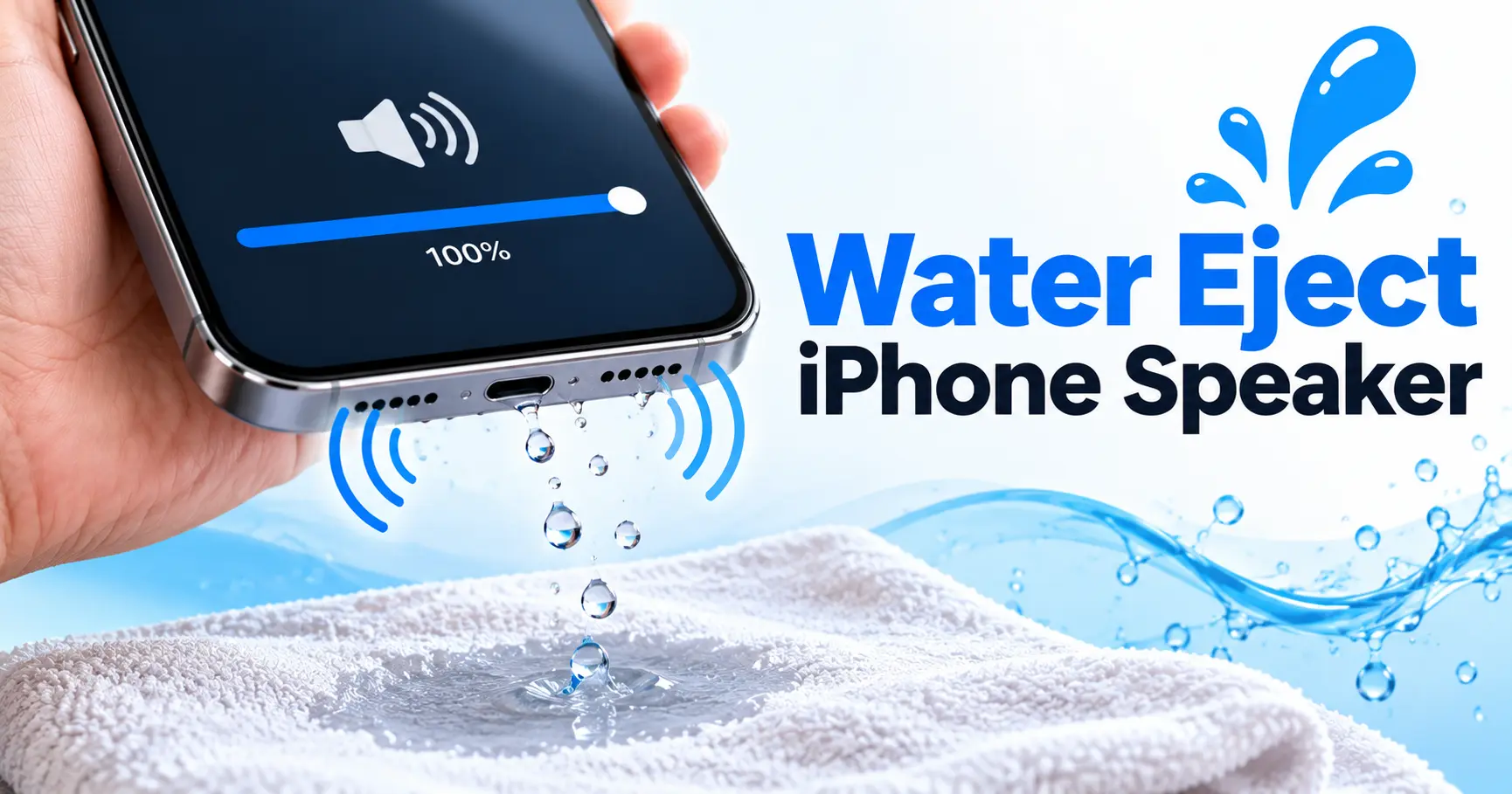
You can test and clean your speaker for free at fixmyspeaker.tech. The tool runs in your browser with no app to download. It plays a specific sound frequency through your speaker to push out dust and trapped moisture. If your notification sound plays cleaner after running it, the speaker was the issue all along.
For more on this, see our guide on ringtone sounds muffled causes and fixes.
Before You Close This Tab
You picked your notification sound. Now check if your speaker will play it the way it should.
If your new alert tone sounds flat, muffled, or quiet at full volume, the speaker grill is likely clogged with dust or lint. That is a speaker problem, not a problem with the audio file.
Run a free speaker sound test at fixmyspeaker.tech. No download. No account. No cost. It takes about 30 seconds to find out if your speaker needs a clean.
Frequently Asked Questions
What is the most downloaded notification sound in the world?
Light Hearted, available on notificationsounds.com, is the site’s top downloaded notification sound by total volume. It is a cheerful, bright melody under two seconds long. The site has tracked download counts since 2008, which makes its popularity chart a reliable measure of what real users choose most.
What is the best notification sound for Android?
The best notification sound for Android is short (1 to 3 seconds), easy to pick out in a crowd, and saved as an MP3 audio file or OGG format. Popular picks include Marimba Bubble from Uppbeat, Message Pop Alert from Mixkit, and Light Hearted from notificationsounds.com. All three are free and do not need an account to download.
Can I download notification sounds without creating an account?
Yes. notificationsounds.com and Mixkit let you download sound effect files with no registration. Uppbeat requires a free account for some files. Zedge lets you browse and grab free notification sounds without signing in on most platforms.
How long should a notification sound be?
A notification sound should be between 1 and 3 seconds. Sounds under 1 second can be missed in noisy places. Sounds over 3 seconds feel intrusive when alerts arrive often. Most top notification ringtones on popular download sites fall between 1 and 2 seconds.
Why is my notification sound not showing up in Android settings?
The file is most likely in the wrong folder. Android only reads notification sounds saved in the Ringtones folder at Internal Storage > Ringtones. If the MP3 is still in the Downloads folder, open your file manager, move the file to Ringtones, then restart the phone. Check Settings > Sound and Vibration and it should appear.
What format do notification sounds need to be on iPhone?
iPhone notification sounds must be in M4R format. A plain MP3 will not show up in Settings > Sounds and Haptics. Convert the MP3 to M4R using GarageBand, export it as a ringtone, and it will appear automatically in your iPhone notification sound settings.