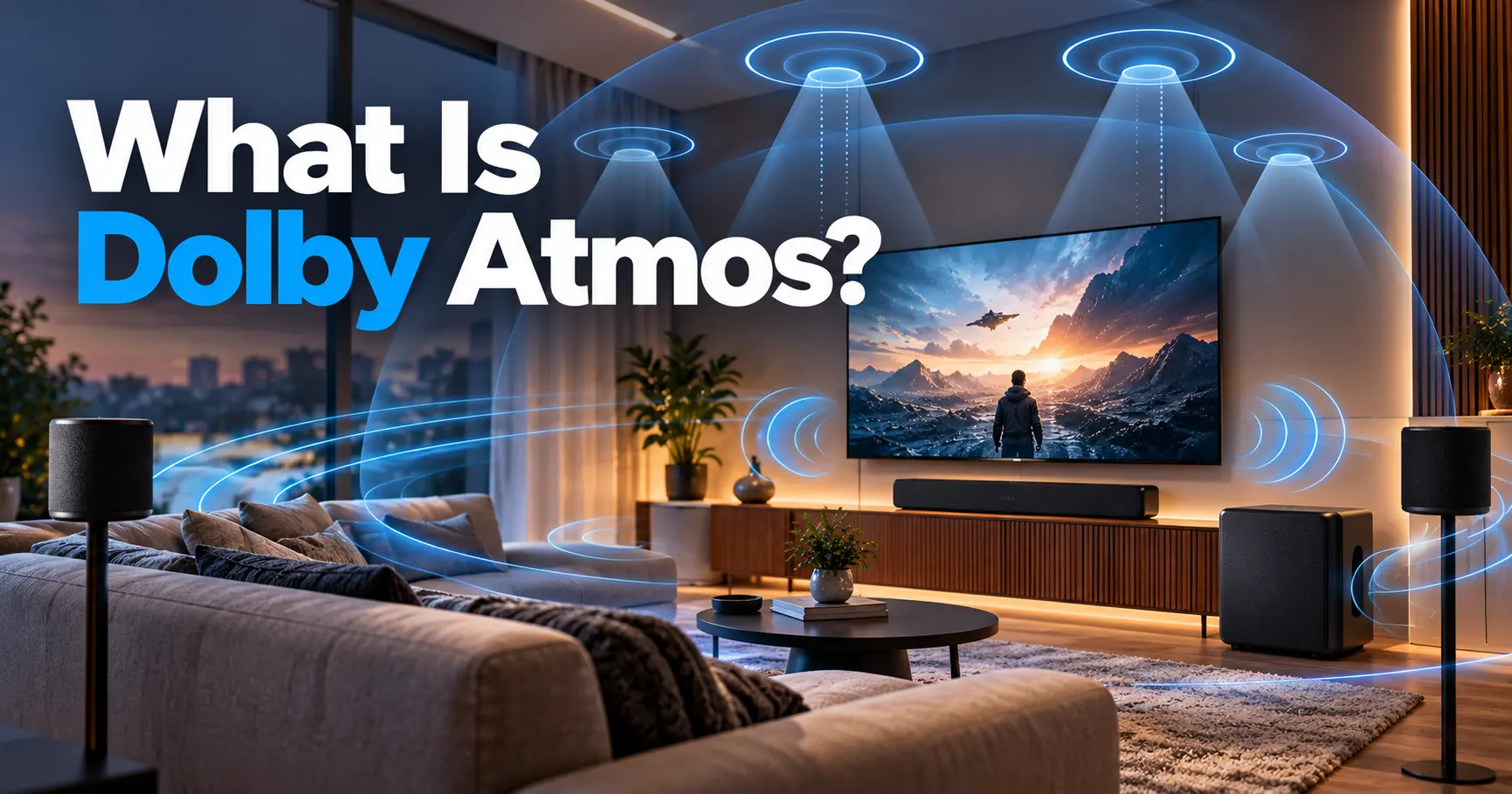
Dolby Atmos is an object-based audio format that places sounds in a full three-dimensional space around you, including above and behind, rather than locking them to fixed left and right speaker channels. Launched in 2012, it now covers 94% of original streaming films, over 250,000 music tracks, and 150+ car models. You can hear it through a soundbar, a home theater setup, or standard headphones.
You have probably seen the Dolby Atmos label on your TV box, soundbar, or streaming app. But what does it actually change about what you hear?
This guide answers that from scratch. You will learn what Dolby Atmos is, how it works, what you need to experience it, and whether it makes a real difference for movies, music, and gaming.
What Is Dolby Atmos?
Dolby Atmos is an immersive audio format created by Dolby Laboratories. It first appeared in 2012 at the premiere of the Disney/Pixar film Brave. Today it is the most widely used spatial audio format in the world.
The key difference between Dolby Atmos and older audio formats comes down to one idea. Sounds are no longer locked to fixed speaker channels. In a standard 5.1 or 7.1 surround sound setup, each sound gets assigned to a specific speaker. In Dolby Atmos, sounds are stored as audio objects with three-dimensional position data. The system places each object in the best available speaker at the moment it plays.
This is what lets Dolby Atmos work in a 64-speaker cinema and through a single soundbar or a pair of headphones. Dolby Cinema uses this system in more than 7,800 screens across 105 countries. As of 2026, 94% of original streaming films and series on Netflix, Apple TV+, and Disney+ are mixed in Dolby Atmos, according to Dolby Laboratories.
Dolby Atmos is one format within the broader category of spatial audio. That guide covers the full picture, including how formats like DTS:X, Apple Spatial Audio, and Windows Sonic compare to each other.
How Is Dolby Atmos Different From Regular Surround Sound?
Standard surround sound locks each sound to a fixed speaker channel: left, right, center, rear. Dolby Atmos removes that limit. Each sound is stored as a moveable object with a three-dimensional position. The system places it in whichever speaker is closest when it plays, and it adds height so sounds can come from above you.
With a standard 5.1 surround sound system, you get five channels plus a subwoofer. Sounds are tied to those six points. That works well, but it keeps everything on a flat, horizontal plane.
Dolby Atmos adds a third number to the speaker configuration. A 7.1.4 system means 7 main channels, 1 subwoofer, and 4 height channels. The height channels use either ceiling speakers or upward-firing overhead speakers that bounce sound off the ceiling. That creates the sense that sound is coming from above you, not just around you.
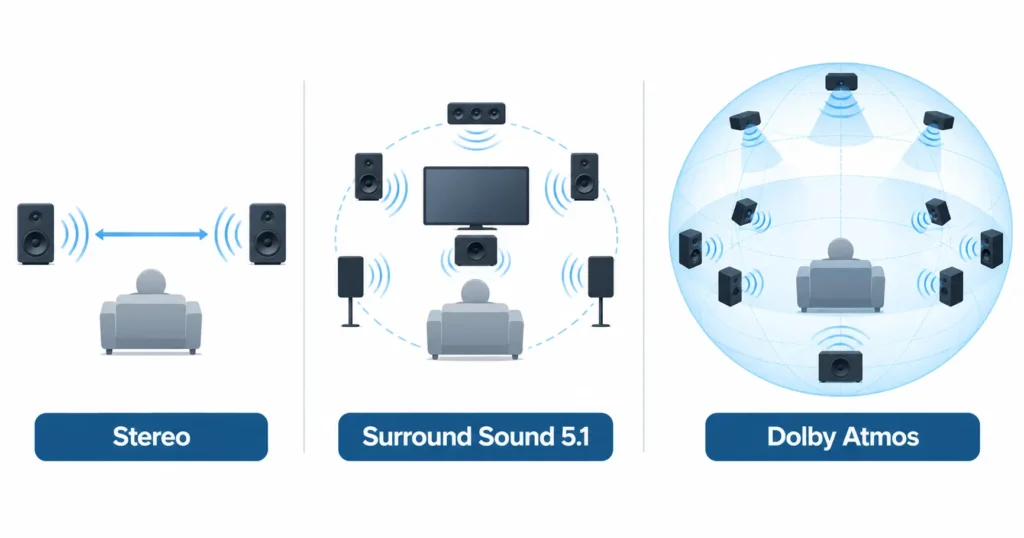
Here is a simple comparison:
| Format | Sound directions | Minimum speakers | Works on headphones |
| Stereo | Left and right only | 2 | Yes, but flat |
| Surround Sound (5.1) | Left, right, front, back | 6 | Needs physical speakers |
| Dolby Atmos | All directions including above | 2 or more (scales up) | Yes, via HRTF |
How Does Dolby Atmos Work?
Dolby Atmos stores every sound as an audio object with X, Y, and Z position coordinates. A built-in Dolby Atmos renderer reads those coordinates at playback and assigns each sound to the best available speaker or headphone channel. The system scales from two speakers to 64, with up to 128 audio objects playing at the same time.
Picture a helicopter in a movie. In a standard 5.1 mix, the sound engineer assigns that helicopter to the left surround channel. With Dolby Atmos, the engineer places it at an actual position in three-dimensional space. The renderer figures out which speaker delivers it best, based on whatever setup is playing it back.
This is also why the same Dolby Atmos mix works across a cinema system, a home soundbar, and a pair of AirPods. The renderer adapts the audio objects to whatever is available.
Dolby Atmos is not a codec by itself. It rides on top of two existing codecs. On 4K Blu-ray discs, it uses Dolby TrueHD, which is lossless. On streaming services, it uses Dolby Digital Plus, which is a compressed version. The lossless version sounds better, but the streaming version still delivers the full three-dimensional effect.
How Does Dolby Atmos Work on Headphones?
Dolby Atmos works through any pair of headphones using a technology called HRTF, or Head-Related Transfer Function. HRTF filters mimic how your outer ear processes sounds coming from different directions. Your brain reads those cues and places the sounds in three-dimensional space, even though the audio is coming from just two small drivers in your earbuds.
You do not need special Atmos-certified headphones. Any stereo pair works for the basic version. According to Qualcomm’s State of Sound research, 76% of all spatial audio listening happens on headphones through binaural rendering.
Some headphones, like AirPods Pro, AirPods Max, Samsung Galaxy Buds 3 Pro, Sony WF-1000XM5, and Bose QuietComfort Ultra, also include built-in gyroscopes. Those sensors track your head movement in real time. When you turn your head, the sound stays anchored to the screen position rather than rotating with you. This is called dynamic head tracking, and it gives you the most realistic listening experience without a speaker system.
What Do You Need for Dolby Atmos?
Three things: Atmos-capable playback hardware, content mixed in Dolby Atmos, and the right connection between them. For a TV setup, that connection is HDMI eARC. For headphones or a phone, a streaming app that carries Atmos content is enough, with no special cables or extra speakers required.

Home Theater Setup
A full home theater Atmos setup starts with an AV receiver that can decode Dolby Atmos. You connect it to your main speakers for front, center, and surround channels, then add overhead speakers above your listening position. A 5.1.2 configuration, meaning two height speakers, is the minimum to get the Atmos height effect.
Your TV needs an HDMI eARC port to pass the Atmos signal to the receiver. According to Omdia’s TV Display and Audio Tracker, 82% of 4K smart TVs now support Dolby Atmos eARC. The Custom Electronic Design and Installation Association (CEDIA) reports that 58% of new AV receiver surround sound installations now include dedicated height speaker channels.
For help deciding where to place your surround and height speakers, see Surround vs Surround Back Speakers.
Soundbar Route (Easiest Entry)
A Dolby Atmos soundbar is the simplest way to add Atmos to your TV. Most quality soundbars use upward-firing drivers to bounce sound off your ceiling, or they use signal processing to create the height effect without physical ceiling speakers.
According to Futuresource Consulting, 68% of soundbars priced above $300 include Dolby Atmos processing. Retail data from Circana puts the average price of an entry-level 5.1.2 Atmos soundbar package at around $420. Your TV still needs HDMI eARC to pass the Atmos signal to the soundbar.
Headphone Route
Any pair of stereo headphones can play Dolby Atmos content through binaural rendering. No special cables or certification needed. If you want dynamic head tracking, you need headphones with built-in gyroscopes and accelerometers, like AirPods Pro, AirPods Max, Galaxy Buds 3 Pro, or Bose QuietComfort Ultra.
Run a quick stereo sound test to confirm your headphones are routing left and right channels correctly before you check your Atmos settings.
Phone or Laptop
Native apps like Apple Music, Netflix, and Amazon Prime Video deliver Dolby Atmos to built-in device speakers or connected headphones. The Chrome browser sends stereo audio only, even when your operating system is set to Dolby Atmos. For Atmos content to work correctly, always use the native app, not a web browser.
According to Billboard and Midia Research, 34% of music streaming subscribers listen to Dolby Atmos tracks regularly when the option is available.
Where Can You Watch and Listen to Dolby Atmos?
Dolby Atmos content is now widely available across major streaming services.
For video streaming, Netflix (Ultra HD plan), Disney+, Apple TV+, and Amazon Prime Video all carry Atmos titles. Peacock became the first streaming service to carry weekly NFL games in Dolby Atmos, starting September 2025. For physical media, 4K Blu-ray discs carry the full lossless Dolby TrueHD version of the audio track.
For music, Apple Music carries approximately 15 million Dolby Atmos tracks, according to Production Expert (2025). Amazon Music Unlimited and Tidal also offer Dolby Atmos music. Universal Music Group and Warner Music Group have remixed more than 250,000 commercial tracks in native Dolby Atmos. According to Billboard’s Spatial Audio Chart Tracker, 88% of Billboard Hot 100 top 10 songs now have an official Dolby Atmos mix. Apple Music pays artists a 10% royalty bonus for releasing tracks in spatial audio.
For gaming, the Xbox Series X supports both Dolby Atmos and Windows Sonic for headphones. The PlayStation 5 uses Sony Tempest 3D AudioTech. According to the Game Developers Conference State of Audio Survey, 72% of major AAA console and PC game releases now feature 3D spatial audio.
Dolby Atmos also runs in more than 150 car models across 35+ brands as of CES 2026, according to Dolby Laboratories.
Spotify note: Spotify launched 24-bit lossless audio in September 2025 but does not offer Dolby Atmos as of October 2026. For Dolby Atmos music streaming right now, Apple Music, Amazon Music Unlimited, and Tidal are your options.
After you set up your Atmos source, run a free surround sound test to check that all your audio channels are routing correctly.
Why Does Dolby Atmos Sound Flat on Some Devices?
This is the part most guides skip, but it matters a lot if you are listening through a phone or laptop speaker.
Dolby Atmos spatial cues live in the 4 to 16kHz frequency range. These are the signals your brain uses to place sounds above and around you in three-dimensional space. According to the Audio Engineering Society, spatial positioning accuracy in HRTF-based binaural audio depends primarily on high-frequency reproduction above 4kHz.
When a speaker or earbud mesh is blocked by water or dust, output drops in exactly that range. The mix is still Dolby Atmos. The app is still sending the right signal. But the speaker cannot deliver the high frequencies that make the audio feel three-dimensional. The result sounds no better than standard stereo, even when all your settings are correct.
This is not a settings problem. It is a physical one.
A quick speaker sound test shows whether your speaker is delivering its full frequency range. If treble sounds thin or missing, the grill may be blocked. Playing a 165Hz tone through your speaker creates enough vibration to push water droplets and dust out through the mesh. Once the grill is clear, the full frequency range comes back, and so does the spatial effect.
The same applies to earbuds. A blocked earbud mesh cuts the high-frequency range that Dolby Atmos headphone rendering depends on. Cleaning the mesh restores the binaural cues your ears need to hear 3D audio properly.
Frequently Asked Questions About Dolby Atmos
Is Dolby Atmos available on Spotify?
No. As of October 2026, Spotify does not offer Dolby Atmos. Spotify launched 24-bit lossless audio in September 2025 but has not added spatial audio. For Dolby Atmos music streaming, Apple Music, Amazon Music Unlimited, and Tidal are the current options.
Do you need a special TV for Dolby Atmos?
You do not need a Dolby Atmos-branded TV. You need a TV with an HDMI eARC port, which passes the Atmos signal to a compatible soundbar or AV receiver. As of 2026, 82% of 4K smart TVs support eARC, according to Omdia. Standard HDMI ARC and optical cables cannot carry a full Atmos signal.
Is Dolby Atmos the same as spatial audio?
No. Spatial audio is the broad category for any technology that creates a three-dimensional sound field. Dolby Atmos is one specific format within that category. Others include DTS:X, Sony 360 Reality Audio, Apple Spatial Audio, and Windows Sonic. Spatial audio is the category. Dolby Atmos is one format inside it.
Is Dolby Atmos worth it?
For movies and gaming, yes. The height dimension adds a sense of space that standard 5.1 cannot match. A Dolby consumer survey found that 64% of listeners prefer Atmos soundtracks over standard 5.1. For music, the benefit depends on whether the track was mixed natively in Atmos or converted from stereo. Entry-level Atmos soundbars start at around $300 to $420.
What is the difference between Dolby Atmos and DTS:X?
Both are object-based audio formats that add height and three-dimensional positioning to your listening experience. Dolby Atmos has wider support across streaming services, mobile devices, and cars. DTS:X is a strong competitor in home theater AV receivers and on 4K Blu-ray discs. Many high-end receivers support both formats. For streaming and headphone use, Dolby Atmos has the broader reach in 2026.
How do I know if Dolby Atmos is working?
Look for the Dolby Atmos badge in your streaming app while content plays. On Windows, check Sound Settings and confirm the spatial audio format shows Dolby Atmos. On iPhone with AirPods, check Control Center for the spatial audio icon. A free surround sound test confirms that each channel is active and routing signal correctly.
If your Dolby Atmos content sounds flat even with the right hardware and the right app, the issue may be your speaker, not your settings. A free speaker sound test at fixmyspeaker shows whether the high-frequency range is clear. If the output is muffled, cleaning the speaker grill may be all you need before Atmos can deliver what the mix promises.