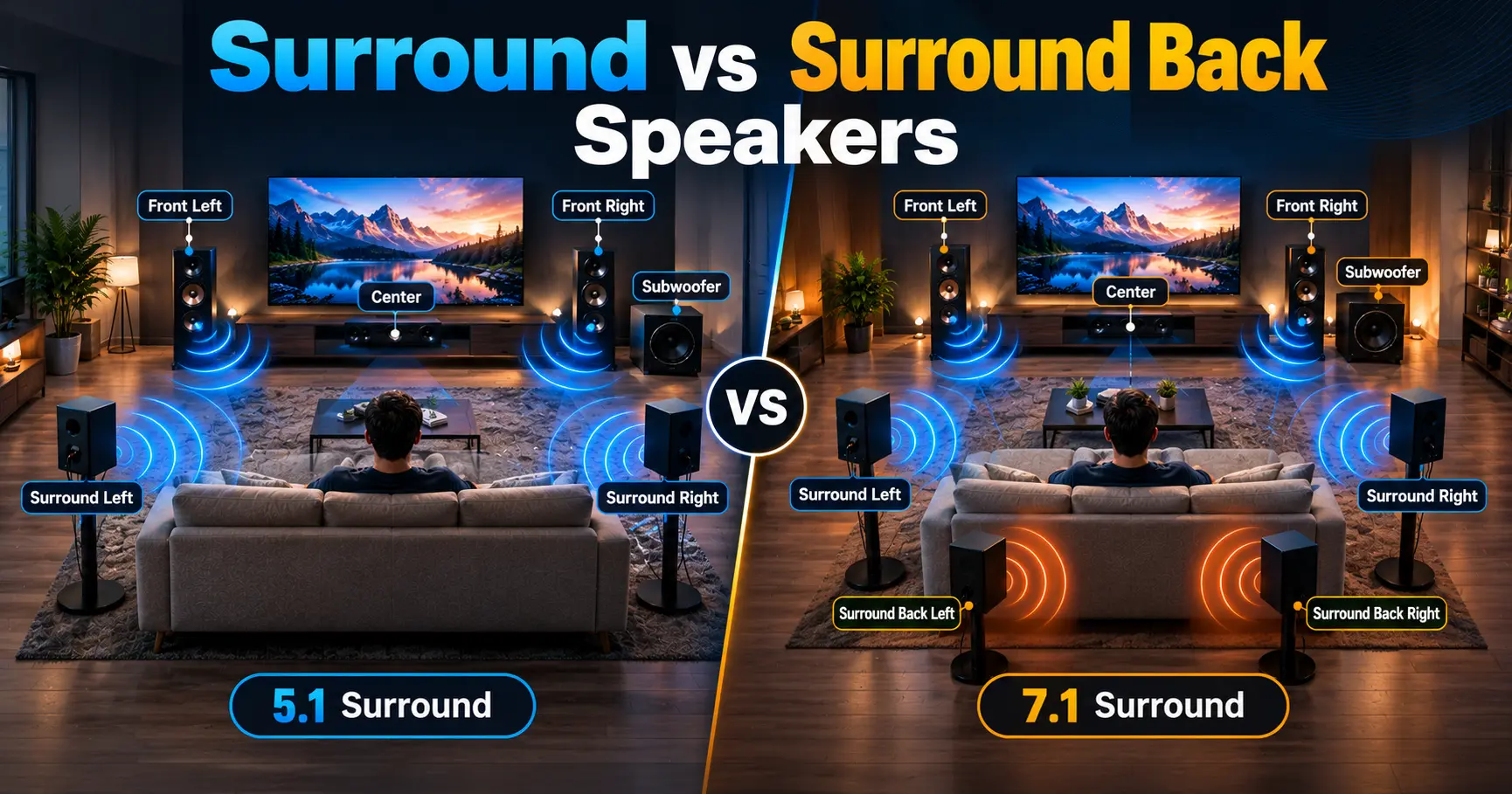
Surround speakers (also called side surround) sit 90 to 110 degrees to your left and right. They are used in both 5.1 and 7.1 systems. Surround back speakers (rear surround) sit 135 to 150 degrees behind you and only appear in 7.1 and larger channel configurations. Both types can be the same physical speaker. The only difference is their position and which AV receiver output channel they connect to. If your setup is 5.1, you only need surround speakers.
Your AV receiver has two separate sets of outputs on the back panel. One is labeled SURROUND. The other is labeled SURROUND BACK. You have a speaker cable in your hand and no clear instruction from the box.
This question trips up a lot of home theater buyers, even people who have owned surround sound systems before. The names sound almost identical, and most manuals skip the plain-English explanation entirely.
This article breaks down surround vs surround back speakers from scratch. You will find out what each type does, exactly where each goes in your room, which receiver output each connects to, and whether your room actually benefits from both. No guesswork required.
What Is the Difference Between Surround and Surround Back Speakers?
Surround speakers are the side channel speakers in a home theater. You place them at 90 to 110 degrees to your left and right, at or slightly above ear level. They are part of every multi-channel audio setup starting from 5.1 and above. When you sit down and watch a film, these are the speakers that create the sense that sound wraps around you from the sides.
Surround back speakers are an extra pair placed behind you. They sit at 135 to 150 degrees from your listening position and only appear in 7.1 home theater configurations and above. Their job is to create clear sound from directly behind your head, giving the rear of the soundstage more depth and precision.
Here is the fact most buyers miss: there is no hardware difference between a surround speaker and a surround back speaker. The same bookshelf speaker, satellite speaker, or bipole speaker can serve in either role. What changes is the position in the room and the AV receiver output it connects to.
Surround vs Surround Back: Quick Comparison Table

| Feature | Surround (Side) | Surround Back (Rear) |
| Placement angle | 90 to 110 degrees | 135 to 150 degrees |
| System compatibility | 5.1 and 7.1+ | 7.1 and above only |
| AV receiver output | SURROUND L/R | SURROUND BACK L/R |
| Room size needed | Any size | 3 to 5 feet of space behind listeners |
| Priority | Essential (start here) | Optional upgrade |
| Content coverage | All 5.1 mixes and Atmos | Discrete 7.1 Blu-ray tracks mainly |
| Can you use the same speaker? | Yes | Yes |
| Works with a 6-channel receiver? | Yes | No, requires 8 channels |
Where Should Surround and Surround Back Speakers Be Placed?
Surround speakers belong at the sides of the room. Surround back speakers go behind you. The exact placement angles matter more than most buyers expect, and two major audio standards give slightly different guidance.
Where to Place Surround Speakers (5.1 and 7.1)
Dolby recommends placing surround speakers at 90 to 110 degrees from the listening position. This puts them roughly to your left and right side, or slightly behind the plane of your ears. Raise them about 2 feet above ear level. This height keeps low furniture and people in front of you from blocking the sound path.
The ITU-R BS.775 standard, an international reference for multi-channel audio speaker placement, recommends a slightly wider angle of 110 to 120 degrees. Many home theater owners find that 100 to 110 degrees works well as a practical middle ground in a typical living room.
Do not mount surround speakers directly in front of you or directly behind you in a 5.1 setup. Their position at the sides is what creates lateral sound envelopment, the feeling that audio wraps around you from every direction.
Where to Place Surround Back Speakers (7.1 Only)
Dolby recommends placing surround back speakers at 135 to 150 degrees behind the listening position for Dolby TrueHD and DTS-HD Master Audio 7.1 content. This places them clearly behind your head, not beside it. Dolby also suggests spacing them the same distance apart as your front left and right speakers for the widest rear channel separation.
Keep surround back speakers at the same height as your side surround speakers. Acoustic Frontiers, which has published a detailed breakdown of Dolby, THX, and ITU-R BS.775 placement guidance, confirms that matching the height across all surround and surround back positions gives the smoothest transition as sound moves around the room.
The minimum space behind the seating area matters here. You need at least 3 to 5 feet of clearance between the rear speakers and the back of your sofa. If your couch is pushed against the back wall, surround back speakers will end up too close to your ears. The rear channel effect collapses entirely in that situation.
What THX and Dolby Disagree On
THX takes a different approach for surround back speaker placement. Rather than spacing them like the front left and right pair, THX says to place them close together on the back wall, no more than 3 feet apart, near the center of the wall. This position activates a feature called Advanced Speaker Array (ASA) found on THX Ultra 2 certified AV receivers from brands like Denon and Marantz.
The practical choice is simple. If your receiver carries a THX Ultra 2 certification, check the manual for its specific surround back placement guidance. If your receiver has no THX certification, follow the Dolby recommendation of 135 to 150 degrees with the speakers spaced wider apart.
Both standards agree that surround back speakers should be raised to roughly ear level and aimed toward the listening area.
After placing all speakers, use the free surround sound test at Fix My Speaker to confirm that each channel fires from the correct position before you start watching anything.
Which Receiver Outputs Do Surround and Surround Back Speakers Use?
This is the section most home theater guides skip. It is also the most common reason speakers stay silent after a full setup.
Which Outputs to Use for a 5.1 Setup
For a 5.1 system, plug your speakers into the SURROUND LEFT and SURROUND RIGHT outputs only.
This applies even if you physically place the speakers behind your sofa rather than to the sides. The label on the output port determines how the AV receiver routes the audio signal. In a 5.1 home theater channel configuration, the receiver disables the SURROUND BACK channels automatically. If you plug your 5.1 speakers into those ports by mistake, you will get no sound at all.
Correct 5.1 wiring:
- Front Left and Front Right
- Center
- Surround Left and Surround Right
- Subwoofer (LFE channel)
Leave the SURROUND BACK outputs empty. Most AV receivers from Denon, Yamaha, and Marantz reassign those amplifier channels to a Zone 2 audio output in a 5.1 configuration. This lets you send audio to a second room without adding speakers to your main setup.
Which Outputs to Use for a 7.1 Setup
For a 7.1 system, use SURROUND L/R for your side speakers and SURROUND BACK L/R for your rear speakers.
Correct 7.1 wiring:
- Front Left and Front Right
- Center
- Surround Left and Surround Right (side speakers, 90 to 110 degrees)
- Surround Back Left and Surround Back Right (rear speakers, 135 to 150 degrees)
- Subwoofer (LFE channel)

If you connect your system over HDMI ARC or HDMI eARC, confirm that your receiver is set to receive a multi-channel PCM or bitstream signal rather than downmixed stereo. HDMI ARC supports compressed 5.1 audio. HDMI eARC supports full uncompressed 7.1 formats including Dolby TrueHD and DTS-HD Master Audio.
After wiring, run your receiver’s auto-calibration system. Audyssey MultEQ, Yamaha YPAO, and Denon MCACC all detect how many speakers are connected and set the correct delay, volume level, and time alignment per channel automatically. Tell the receiver you are running 7.1 during the initial setup so it turns on the surround back channel processing.
You can then confirm all 8 channels are firing correctly with the detailed testing guide at Fix My Speaker.
Do You Need Surround Back Speakers? A Room-Size Decision Guide
Most people with a small or medium-sized room do not need surround back speakers. Here is a clear way to decide.
When Surround Back Speakers Are Worth It
Add surround back speakers if all of the following apply:
- Your room is larger than roughly 200 square feet
- At least 5 feet of clear space exists between the rear speakers and your listening position
- You regularly watch Dolby TrueHD 7.1 or DTS-HD Master Audio 7.1 Blu-ray content
- You already have an 8-channel AV receiver
In a purpose-built home theater room, surround back speakers deliver their real benefit. Sound pans from your side surround speakers to your rear surround back speakers with smooth, precise movement. The rear soundstage feels full and three-dimensional rather than flat.
When Surround Speakers Are Enough
Skip surround back speakers if any of the following apply:
- Your sofa is within 3 feet of the back wall
- Your room is a standard bedroom or smaller living room
- Most of your audio comes from streaming services like Netflix, Spotify, or Apple TV
Knowing what streaming services actually deliver is key to this decision. Most platforms send Dolby Digital 5.1 or Dolby Atmos audio, not discrete 7.1 tracks. True 7.1 content lives mainly on Blu-ray discs with Dolby TrueHD or DTS-ES encoded tracks. DTS-ES and DTS-HD Master Audio 7.1 are both primarily disc-based formats. If you stream the majority of your content, surround back speakers will carry no distinct audio most of the time.
If you are planning to add two more speakers to a 5.1 setup and want an upgrade that actually works with modern streaming content, Dolby Atmos height channels in a 7.1.4 configuration may give you more audible improvement than classic surround backs. Streaming platforms now mix content for Atmos tracks, making height channels a better investment for households that do not watch physical Blu-ray regularly.
To check whether your current system is actually delivering stereo or true multi-channel audio, the stereo sound tester at Fix My Speaker confirms exactly what signal your device is receiving right now.
Can You Use the Same Speaker for Both Surround and Surround Back?
Yes. There is no technical difference between a surround speaker and a surround back speaker as a piece of hardware. A bookshelf speaker, a satellite speaker, a bipole speaker, or a dipole speaker can serve in either role. The position and the receiver channel assignment are the only things that change.
What matters more than the speaker type is timbre matching. Timbre is the tonal character of a speaker, basically how its voice sounds compared to the others in the same system. When all four surround and surround back speakers share the same tonal character, sound moves around the room without a noticeable jump in quality or tone as it passes from one speaker to the next.
If you are expanding from 5.1 to 7.1, buy the same model you already use for your surround speakers. This is the simplest path to a matched sound across all four rear positions.
A quick note on speaker types for these positions:
- Bipole speakers have two drivers that fire in two directions while staying in phase. This creates a wide, spread-out sound field. Bipoles work well in both surround and surround back positions.
- Dipole speakers also have two drivers but fire them out of phase. This creates a diffuse, directionless effect. THX historically recommended dipole speakers for surround positions.
- Monopole (direct-firing) speakers are the most common choice today and work well in both surround and surround back positions without any issues.
How to Test Your Surround and Surround Back Speakers After Setup
After you place and wire everything, run a channel test before starting any real content. This confirms each speaker fires from the right position at the right volume.
Here is what to do:
- Open your receiver’s settings menu and find the Speaker Setup or Test Tone section
- Run the built-in test tone sequence, which plays a tone from each speaker one at a time
- Sit in your primary listening position and listen for sound arriving from the correct direction for each channel
- Note any speaker that stays silent or sounds much louder or quieter than the rest
- After the test tone, run your auto-calibration system (Audyssey MultEQ, Yamaha YPAO, or the equivalent) so it can set delay and volume per channel automatically
- Use the free surround sound test at Fix My Speaker to click each speaker channel on screen and confirm the correct speaker produces audio from the right location
If any speaker sounds muffled or distorted after setup, the fix my back speaker tool and the speaker sound test tool can help you identify exactly which channel has the problem.
Test Your Setup Right Now
Now you have the full picture. Surround speakers go on the sides at 90 to 110 degrees. Surround back speakers go behind you at 135 to 150 degrees in a 7.1 layout. Each type connects to a specific, separate output on the AV receiver. And whether you need both depends almost entirely on the size of your room and the type of content you watch most.
Before you move a single speaker or run a cable, open the free surround sound test to hear exactly which channels your current setup is using and which ones may be missing. One click, no download, and you will know right away what is firing and what is not.
Frequently Asked Questions
What is the difference between surround and surround back speakers?
Surround speakers sit at 90 to 110 degrees to your left and right sides and are active in both 5.1 and 7.1 systems. Surround back speakers sit at 135 to 150 degrees behind the listener and only activate in 7.1 channel setups. Both can be the same physical hardware. The distinction is placement angle and which AV receiver output channel each speaker connects to.
Should I plug my 5.1 speakers into the surround or surround back outputs?
For a 5.1 system, always use the SURROUND LEFT and SURROUND RIGHT outputs, even if the speakers are placed behind you. The SURROUND BACK outputs are reserved for the extra rear pair in a 7.1 setup only. Using the wrong output in a 5.1 system typically results in no sound from those speakers because most receivers disable those channels in a 5.1 home theater channel configuration.
What angle should surround back speakers be placed at?
Dolby recommends 135 to 150 degrees behind the listening position for surround back speakers in a 7.1 setup. For Dolby TrueHD content, spacing them the same distance apart as your front speakers gives the best rear channel separation. THX recommends placing them close together on the center of the back wall, no more than 3 feet apart, to activate its Advanced Speaker Array processing on THX Ultra 2 certified receivers.
Is 7.1 better than 5.1 for a small room?
Not in a small room. If your sofa is within 3 feet of the back wall, surround back speakers end up too close to your head and the directional effect collapses. A well-set-up 5.1 system in a smaller space performs better than a cramped 7.1 layout. Surround back speakers work as intended when at least 5 feet of space exists between the rear speakers and the primary listening position.
Can the surround back outputs on a receiver be used for a second zone?
Yes. On most modern AV receivers, the surround back amplifier channels double as a Zone 2 audio output when no surround back speakers are configured. This lets you power a separate pair of speakers in another room from the same receiver. Check your receiver’s manual to confirm the Zone 2 channel assignment, as the routing varies by brand and model.
What is the difference between bipole and dipole surround speakers?
Bipole speakers have two drivers that fire in two directions while staying in phase, creating a wide, spread-out sound field that works well in both surround and surround back positions. Dipole speakers also have two drivers but fire them out of phase, creating a diffuse, directionless effect. THX historically recommended dipoles for surround positions. Most modern home theaters use standard monopole direct-firing speakers for both roles without any issues.
Does adding surround back speakers make a noticeable difference?
It depends on room size and content type. In a large room with proper 7.1-encoded Blu-ray audio using Dolby TrueHD or DTS-HD Master Audio tracks, sounds pan behind your head with more precise tracking and the improvement is clearly audible. In a small room or when watching streamed 5.1 content, surround back speakers often carry no distinct audio or make the soundstage feel crowded. Room size and content format are the two factors that actually determine whether they add value.