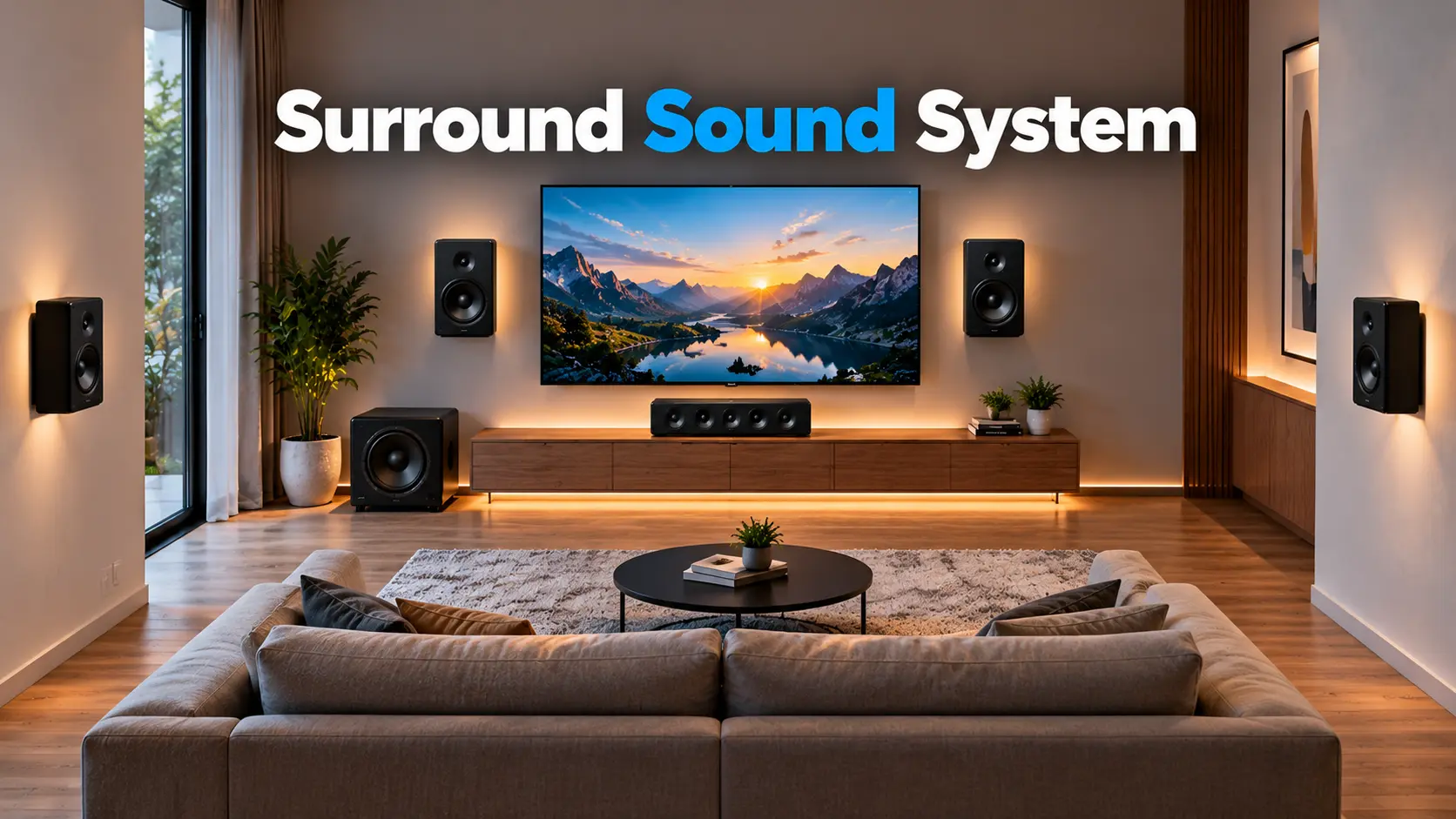
A surround sound system places speakers around a room so audio comes from different directions, not just from your TV. A 5.1 surround sound system with five speakers and one subwoofer works for most living rooms. Larger rooms do better with a 7.1 surround sound system. Dolby Atmos adds height channels above you. After connecting everything, run a channel test AND a content source test to confirm each speaker is working correctly.
You set up five speakers. You ran the cables. You pressed play. The audio still sounds like it is coming straight from the TV. This is the most common problem people run into after buying a surround sound system for TV, and the fix is usually simple once you know where to look.
This guide covers three things: how to pick the right system for your room, what equipment you actually need, and how to check that the system is delivering real multi-channel audio, not just stereo through five speakers.
What Does a Surround Sound System Actually Include?
A surround sound system is not just a group of speakers. It is a set of parts that work together to split audio into separate channels and send each one to the right speaker. Every part in the list below must work correctly for the system to produce true surround sound.
| Component | What It Does | Required? |
| Speakers | Carry audio to your ears from different directions in the room | Yes |
| Subwoofer | Handles deep bass through the LFE (Low Frequency Effects) channel | Recommended |
| AV Receiver or Powered Soundbar | Decodes the audio signal, amplifies it, and routes it to each channel | Yes |
| HDMI eARC Cable | Passes multi-channel audio from your TV to the receiver | Yes |
| Media Source | Streaming app, Blu-ray player, or game console that outputs a multi-channel signal | Yes |
Which Surround Sound System Is Right for Your Room?
The right surround sound system depends on two things: the size of your room and how much setup you want to deal with.
Use this table to find the right starting point:
| Room Size | Best Config | Best Hardware Path | Estimated Cost Range |
| Under 150 sq ft | 2.1 or soundbar | Powered soundbar alone | $100 to $400 |
| 150 to 300 sq ft | 5.1 surround sound system | Soundbar with wireless rears OR receiver + speakers | $300 to $1,000 |
| Over 300 sq ft | 7.1 surround sound system | AV receiver + passive speaker package | $600 to $2,000+ |
| Dedicated theater room | 7.1.4 Dolby Atmos | AV receiver + height speakers | $1,200 to $5,000+ |
The 5.1 surround sound system is the right choice for most people. Every movie, TV show, and major game is mixed for 5.1, so you get the full audio experience the creators intended. The 7.1 surround sound system adds two rear speakers directly behind your seating position. This helps in larger rooms where the side surround speakers cannot cover the space behind you well.

Small rooms are a special case. If your room is under 150 square feet, a 5.1 setup will actually sound worse than a good 2.1 system. When surround speakers sit too close to your head, the effect sounds cramped instead of immersive.
Receiver + Speaker Package vs. Powered Soundbar
These are the two hardware paths to a working surround sound system. Each one has real advantages and real trade-offs.
| Feature | AV Receiver + Passive Speakers | Powered Soundbar with Wireless Rears |
| Setup complexity | Higher (speaker wire, port config) | Lower (wireless pairing, fewer cables) |
| Audio quality per dollar | Better | Good, with limits |
| Upgrade path | Swap any part over time | Usually locked to one brand |
| Cable count | High | Low |
| Dolby Atmos support | Yes, on Atmos-capable receivers | Yes, on supported models |
| Price range | $400 to $2,000+ | $200 to $1,500+ |
A wireless surround sound system through a soundbar is the right pick if you want fast setup with no speaker wire running across the room. Brands like Sonos, Bose, and Yamaha offer powered soundbars with wireless rear speakers that create true discrete channels.
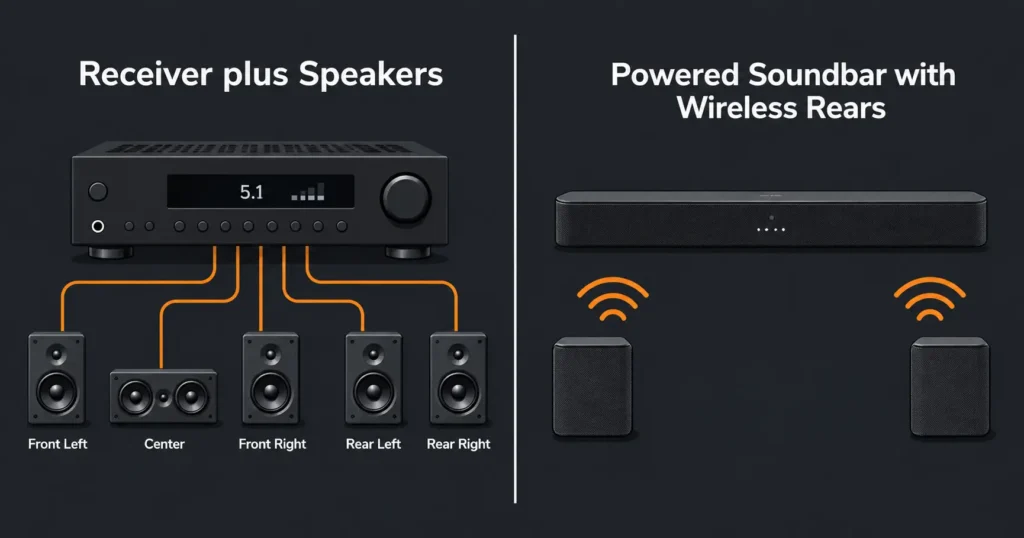
A receiver plus passive speaker package gives you better audio for the money and lets you upgrade one speaker at a time as your budget grows.
One thing to be clear about: a basic soundbar with no wireless rear speakers is NOT a surround sound system. It is a stereo device with audio processing to simulate width. Soundbar adoption in urban households globally reached 32% in 2025, up from 19% in 2019, but that number includes both true surround setups and single-bar stereo systems.
What Equipment Do You Actually Need for Surround Sound?
Here are the five parts every working surround sound system needs.
1. Speakers A 5.1 system needs five full-range speakers: front left, front right, center channel, surround left, and surround right. The center channel carries almost all the dialogue in a movie. The front speakers carry main sound effects and music. The surround speakers carry ambient sounds and position cues that make the audio feel three-dimensional.
2. Subwoofer Per the THX standard, any audio below 80 Hz routes to the subwoofer through the LFE channel. Your main speakers cannot reproduce those frequencies cleanly on their own. Without a subwoofer, bass sounds in explosions, music, and action sequences get lost or distorted through the front speakers.
3. AV Receiver or Powered Soundbar An AV receiver for surround sound is the core of a traditional setup. It decodes Dolby Digital, DTS, Dolby Atmos, and DTS:X signals and sends each channel to the correct speaker at the right volume. Receivers from Yamaha, Denon, and Onkyo all include audio decoding, amplification, and room correction tools built in.
4. HDMI eARC Connection HDMI eARC (Enhanced Audio Return Channel) is the only cable type that can pass full Dolby Atmos and uncompressed 7.1 audio from a TV to a receiver. A regular optical (S/PDIF) cable can only carry compressed 5.1. About 82% of 4K smart TVs now support HDMI eARC, so check your TV’s HDMI port labels before buying cables. Look for the label “eARC” or “ARC” on the HDMI port.
5. A Multi-Channel Media Source Your Blu-ray player, gaming console, or streaming app must send a multi-channel audio signal. If the source outputs stereo, every speaker in your home theater system plays the same left and right mix with no surround information. This is the most common reason a fully connected system sounds like stereo.
Do You Need a Receiver?
Only if you are using passive speakers. Passive speakers have no built-in amplifier. They need an external amp to make sound. An AV receiver for surround sound provides that amplification and also decodes the audio signal and routes each channel. Powered soundbars handle decoding and amplification internally, so they do not need a separate receiver. If you buy a speaker package from Klipsch, Polk Audio, or a similar brand, a receiver is required.
How to Set Up a Surround Sound System Step by Step
A proper surround sound system setup follows a specific order. A single missed step is usually why a system sounds wrong after everything is connected.
Step 1: Position your speakers Place each speaker in the correct spot before connecting anything. Use the placement table in the next section.
Step 2: Connect speakers to the receiver Connect the speaker wire so red goes to red and black goes to black at both the speaker and the receiver. Wrong polarity (mixing up the wires on one speaker) causes thin sound and weak bass. Check every connection before powering on.
Step 3: Connect your TV to the receiver via HDMI eARC Use an Ultra High Speed HDMI cable. Plug it into the HDMI eARC port on your TV and the matching eARC or ARC port on your receiver. This connection is how Dolby Atmos and multi-channel audio travels from the TV to the receiver.
Step 4: Configure your audio output settings On Windows 11, right-click the speaker icon in the taskbar and go to Sound Settings. Select your audio device, click Configure, and choose 5.1 Surround or 7.1 Surround. On a smart TV, go to the audio output settings and set the audio format to Dolby Digital or Dolby Atmos based on your receiver’s support.
Step 5: Run auto-calibration Most modern receivers from Yamaha (YPAO), Denon (Audyssey), and Onkyo include an auto-calibration microphone. Place the mic at your listening seat and run the program. It measures each speaker’s distance, level, and frequency response, then sets each channel to 75 dB SPL at your seat. If your receiver lacks this feature, use a free SPL meter app on your phone and adjust each channel level manually in the receiver’s speaker settings menu. Dirac Live is another paid room correction option found on higher-end receivers.
Step 6: Verify the setup Running auto-calibration is not the final step. Verification is. See the section below.
Where to Place Each Speaker

Speaker placement changes how good your system sounds more than almost any other single factor. The ITU-R BS.775 international standard defines these reference positions for a 5.1 or 7.1 home theater system:
| Speaker | Angle from Center | Height | Notes |
| Front Left and Right | 60 degrees | Ear level when seated | Keep equidistant from your seat |
| Center Channel | 0 degrees (straight ahead) | Ear level when seated | Place directly above or below the TV |
| Side Surrounds | 90 to 110 degrees | Slightly above ear level | Aim toward the listening position |
| Rear Surrounds (7.1 only) | 135 to 150 degrees behind seat | Slightly above ear level | Point inward toward listening position |
| Subwoofer | Flexible position | Floor level | Avoid placing in room corners if possible |
For a deeper look at the difference between side surround and rear surround speaker positioning, see Surround vs Surround Back Speakers.
Does Your Surround Sound System Actually Work?
Two tests are required. Most people only run one and assume everything is fine.
Test 1: The OS channel test This checks that each speaker receives a signal from your device. On Windows, go to Sound Settings, click Configure on your audio device, and select 5.1 or 7.1 Surround. Click Test and a chime plays from each speaker in sequence. If a speaker stays silent, there is a wiring or driver problem on that channel. On a smart TV, look for a Speaker Test or Sound Test option inside the audio settings menu.
Test 2: The content source test This checks that your media source is actually sending multi-channel audio. Passing the OS channel test does NOT mean your movies play in surround sound. Here is why.
Browsers like Chrome and Firefox only output stereo audio. A 5.1 movie on Netflix in a browser tab plays as stereo, even with a full 7.1 home theater system connected. To get real multi-channel audio from streaming, use a native app: the Netflix app, the Disney+ app, or the Apple TV app on your TV or streaming device. On a PC, play a local MKV file with a 5.1 audio track in VLC Media Player to confirm your system can receive and play multi-channel audio.
The fastest way to check every speaker channel is to run a free surround sound test at fixmyspeaker.tech. It sends a test tone to each channel position, including front left, center, front right, surround left, surround right, and subwoofer, one at a time. If you want to check whether your current signal is stereo or multi-channel, the stereo sound tester shows you exactly what your device is outputting right now.
Troubleshooting by symptom:
| Symptom | Most Likely Cause | Fix |
| Rear speakers silent during movies | Source sends stereo only | Switch from browser to native streaming app |
| Subwoofer makes no sound | “Full-range” checked in OS settings | Uncheck it so the 80 Hz crossover sends bass to the sub |
| All sound from front speakers only | OS not set to 5.1 or 7.1 | Configure OS output to match your speaker count |
| System sounds like stereo after full setup | HDMI ARC instead of eARC | Use the eARC port with an Ultra High Speed HDMI cable |
| One channel is much quieter than others | Channel levels unbalanced | Set each speaker to 75 dB SPL at the listening seat |
| Dialogue is hard to hear over effects | Center channel level too low | Raise center channel by +2 to +3 dB in receiver settings |
Is Dolby Atmos Worth Adding to Your Surround System?
Dolby Atmos adds one thing that a 5.1 or 7.1 surround sound system cannot do on its own: it places sound above you.
In a standard 5.1 or 7.1 channel configuration, audio moves around you in a horizontal plane. A passing car moves from the front speakers to the rear speakers. With Dolby Atmos, sound becomes a 3D object. A helicopter can start above your head, move forward, and land to your left. The Dolby Atmos rendering engine can place up to 128 discrete audio objects at the same time, and your receiver decides which speakers carry each one at any given moment.
DTS:X is the competing object-based audio format from DTS that works the same way. Both Dolby Atmos and DTS:X are supported by most modern receivers from Yamaha, Denon, and Onkyo.
Is the upgrade worth it? For movie watchers, the answer is yes. About 94% of new original streaming films and TV series are now mixed natively in Dolby Atmos, including content from Netflix, Disney+, and Apple TV+. That audio sits unused unless your system includes height speakers or upward-firing Atmos speaker modules.
About 58% of newly installed custom home theater surround sound systems now include dedicated overhead height channels, based on data from CEDIA (Custom Electronic Design and Installation Association). Dolby Atmos has shifted from a luxury add-on to a standard part of serious home theater builds.
What you need for Atmos at home:
- A Dolby Atmos-capable AV receiver
- Ceiling-mounted height speakers OR upward-firing Atmos speaker modules on top of your front speakers
- A flat ceiling at normal height (8 to 9 feet is ideal)
- Content played through a native streaming app (not a browser)
If your ceiling is very high or has an irregular shape, the reflected sound from upward-firing speakers may not arrive from the right direction. A well-placed 5.1 speaker system with quality speakers will sound better in a difficult room than a cheap Atmos setup in the same space.
To learn how Dolby Atmos uses HRTF (Head-Related Transfer Function) processing, see What Is Spatial Audio?
Common Surround Sound Setup Mistakes and How to Fix Them
Even with the right equipment, a few mistakes can make a good home theater system sound flat. Here are the ones that come up most often:
| Mistake | Why It Happens | Fix |
| Thin sound with weak bass | Speaker wire connected with wrong polarity on one speaker | Swap wires so red goes to red, black goes to black on every speaker |
| Subwoofer produces no sound during calibration | “Full-range speakers” box is checked in OS speaker setup | Uncheck it so the 80 Hz THX crossover routes bass to the subwoofer |
| Rear speakers pass OS test but are silent in movies | Media player or streaming app sends stereo, not multi-channel audio | Switch to a native streaming app or change game audio settings to surround output |
| Everything sounds like stereo after full Dolby Atmos setup | TV uses HDMI ARC port instead of eARC | Move cable to the eARC-labeled HDMI port, use an Ultra High Speed HDMI cable |
| One surround speaker is much louder than the other | Speaker output levels were not calibrated | Use an SPL meter app to set each channel to 75 dB at the listening seat |
| Dialogue gets lost under music and sound effects | Center channel level is set too low | Raise the center channel by +2 to +3 dB in the receiver’s speaker level settings |
| Gaming headset virtual surround sounds flat | Companion software is turned off | Open your headset’s app (Razer Synapse, Logitech G Hub, SteelSeries GG) and turn on virtual surround processing |
One mistake that catches a lot of people: they run the Windows channel test, each speaker fires in sequence, and they assume the system is working. The OS test plays a built-in audio file, not your movie. It tells you whether each speaker gets a signal from the OS. It does NOT tell you whether your Netflix stream, your Blu-ray player, or your game console is sending a multi-channel signal. Run a free surround sound test during actual content playback to confirm every channel is active during real use.
Start with a Channel Test Before Your First Movie
Once your speakers are in position and your audio settings are configured, do not skip the verification step. Connect everything, run the OS channel test to confirm each speaker fires, then switch to a native streaming app or a Blu-ray disc and play content you know carries a 5.1 or Dolby Atmos audio track.
The free surround sound test at fixmyspeaker.tech fires a test tone from each channel position, including front left, center, front right, surround left, surround right, and subwoofer, one at a time. You can hear exactly which speakers are active, which are silent, and whether the audio is coming from the correct spot in the room. Run it before your first movie and you will know every channel is working the way it should.
Frequently Asked Questions About Surround Sound Systems
What is the difference between a home theater system and a surround sound system?
A surround sound system refers to the speaker layout and audio routing setup. It covers the channel configuration (5.1, 7.1, Dolby Atmos) and the equipment that drives it. A home theater system is a broader term. It includes the display, the surround speakers, the receiver, the seating arrangement, and all components set up together in one room. Every home theater system uses surround sound, but a surround sound system can exist in any living room without a dedicated theater.
Does a surround sound system need a receiver?
Only if you are using passive speakers. Passive speakers have no built-in amplifier and cannot process an audio signal on their own. An AV receiver decodes the audio, amplifies it, and routes each channel to the right speaker. A powered soundbar with wireless rear speakers handles all of that internally, so no separate receiver is needed. If you buy a traditional speaker package from Klipsch, Polk Audio, or Bose, a receiver must be purchased separately.
How many speakers does a surround sound system need?
A 5.1 surround sound system uses six components: front left speaker, front right speaker, center channel speaker, surround left speaker, surround right speaker, and one subwoofer. A 7.1 surround sound system adds two rear surround speakers behind the listening position for eight total components. A powered soundbar with two wireless rear speakers creates a true 5.1 channel layout with fewer physical units.
Is a soundbar the same as surround sound?
Not by default. A basic soundbar is a stereo device. It uses digital audio processing to simulate a wider sound stage, but that is a simulation, not discrete surround channels. A soundbar paired with separate wireless rear speakers, such as those from Sonos or Bose, creates real, independent surround channels and counts as a true surround sound system for TV and home use.
How do I know if my surround sound system is working correctly?
Run two tests. First, set your OS to 5.1 or 7.1 output and run the built-in speaker channel test. This confirms each speaker fires. Second, play a Dolby Digital or Dolby Atmos-encoded movie or show through a native streaming app, not a browser. Chrome and Firefox only output stereo. A free surround sound test at fixmyspeaker.tech fires a tone from each channel position so you can hear which speakers are actually receiving a signal during real playback.
Can you connect a surround sound system directly to a TV without a receiver?
Yes. Connect a powered soundbar with wireless rear speakers to your TV using an HDMI eARC cable. This passes multi-channel audio including Dolby Atmos directly from the TV to the soundbar. No separate receiver is needed. If you are using passive speakers, a receiver is required because passive speakers cannot amplify a signal on their own.
What is the best surround sound system for a small room?
For rooms under 150 square feet, a 2.1 setup or a quality soundbar with a subwoofer performs better than a full 5.1 system. Surround speakers placed too close to the listening position in a small room create a narrow, cramped sound field. Speaker quality matters far more than speaker count in small spaces. A high-quality stereo pair with a good subwoofer will outperform a budget 5.1 system in the same small room.